Position Management
Manage workforce organization and business operations with a single software

Position Management software overview
Set your organization up for success
Our configurable Position Management software helps you manage and standardize the entire employee life cycle, scale your workforce and plan ahead. It also streamlines business processes, boosts productivity and supports enterprise process automation in one software.
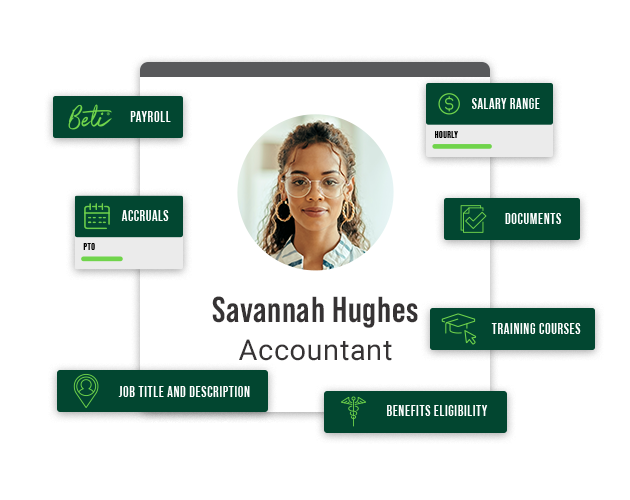

Provide position clarity
When titles, salary ranges, workflows and more tie to the position, not the person, you can manage your org and fill open roles with less effort. This tool streamlines payroll, employee changes, compensation, staffing and time management by standardizing role-based information and eliminating manual data entry. It even writes job descriptions for you based on a few keywords.

Put employees on the path to success
When everything ties back to a position, employees see where they fit in the organization, how to plan their careers and how their work supports day-to-day operations.

Accurate hours and pay simplified
Accrual amounts, earnings, pay classes, labor allocations and more are tied to each position to help keep payroll accurate, strengthen data consistency and support compliance.

Automation starts here
The framework for efficiency
Position Management is key for automation. Its data connects to nearly every part of our software, so it becomes an information hub for a variety of HR processes. With the right structure, these processes become streamlined workflows that scale across the enterprise organization. See how we position you to win.
Charting your success
Our Position Management software helps you keep pace with an ever-changing workforce and scales as you grow. All within our single software, data flows automatically across employee profiles, benefits, time-off balances and more, improving efficiency across teams.
Structure made seamless
Organize your business and help meet staffing needs by optimizing talent management. Clearly define and standardize your reporting structure, position levels and seats. With configurable tools to categorize personnel companywide, Paycom scales with you.
Bye-bye, administrative burden
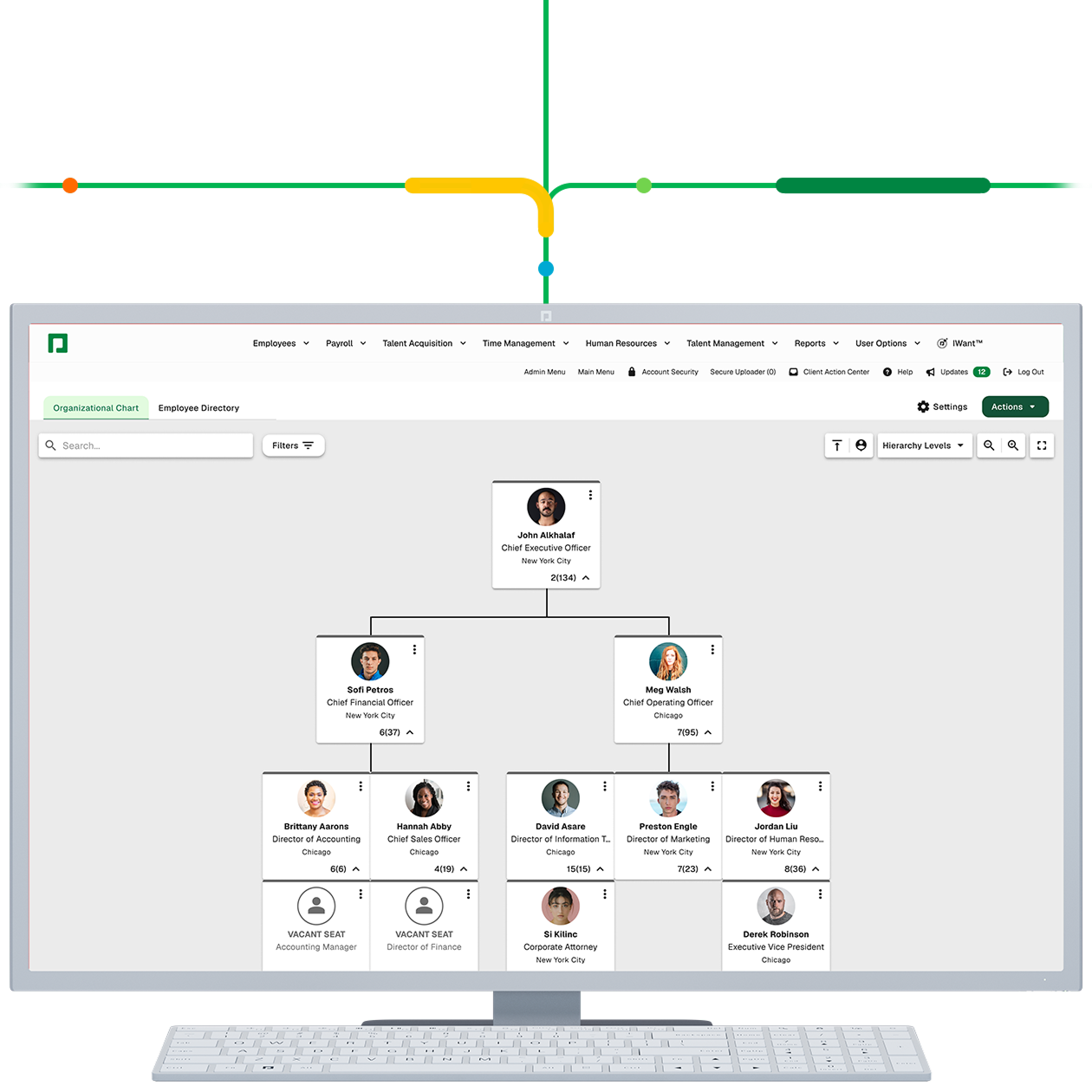
Stop manually building org charts or writing job descriptions for every role. Paycom helps you put people first so you can lead, not manage processes, tools and technology. Plus, as you create positions within the software, it automatically generates an organizational chart, giving you a clear and up-to-date view of your structure.
Get a bird’s-eye view of your business
Easily search for employee details and see open positions for better staffing visibility, faster decisions and smoother workflows.
Charting your success
Our Position Management software helps you keep pace with an ever-changing workforce and scale as you grow. All within our single software, data flows automatically across employee profiles, benefits, time-off balances and more, improving efficiency across teams.
Structure made seamless
Organize your business and help meet staffing needs by optimizing talent management. Clearly define and standardize your reporting structure, position levels and seats. With configurable tools to categorize personnel companywide, Paycom scales with you.
Bye-bye, administrative burden
Stop manually building org charts or writing job descriptions for every role. Paycom helps you put people first so you can lead, not manage processes, tools and technology. Plus, as you create positions within the software, it automatically generates an organizational chart, giving you a clear and up-to-date view of your structure.
Get a bird’s-eye view of your business
Easily search for employee details and see open positions for better staffing visibility, faster decisions and smoother workflows.
HOW DOES PAYCOM STREAMLINE DATA ACCESS?
The employee data you need — all at your command
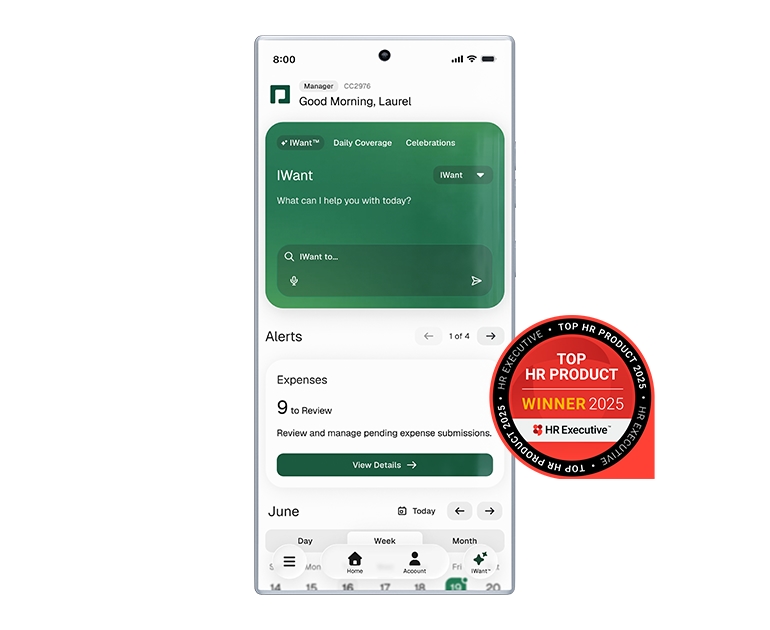
We’ve revolutionized how users find and access applicant and employee data. Instead of hunting for the info you need, simply ask IWant™ — the industry’s first command-driven AI engine in a single database. It searches employee profiles and management dashboards to deliver instant, accurate answers.
How Position Management Software Automates Workforce Planning

Without sound position management, workforce planning is a shot in the dark. Read how automated HR software simplifies the process.
Position Management impact
Where Position Management makes the biggest difference
Empower leaders with real-time access to critical employee data and tools, right from their mobile devices. With streamlined workflows for approvals, feedback and team insights, managers can make informed decisions anytime, anywhere — keeping productivity and engagement high.
Discover how this tool empowers members of your workforce to manage their own personal information, benefits, time-off requests and more. Employees can easily update details, view pay stubs and access important HR documents — all from one convenient app, 24/7.

Streamline HR processes by allowing quick and accurate updates to employee records. Easily initiate changes for promotions, transfers, salary adjustments and more — all with automated workflows and built-in compliance checks.
Easily close leadership gaps and proactively approach the future of your business with accurate, clear visibility into key positions and employee readiness.
Define job titles, descriptions, pay classes, salary ranges and more for a seamless talent acquisition process. Enter a few keywords and our tool autogenerates job descriptions.

Tie parameters for punches, time off, earnings and pay to specific roles.
Tying required skills and salary grades to a position makes it easy to offer competitive wages, merit-based increases, one-off bonuses and commissions.

Our payroll automatically builds itself from the top down to fit each position and compensate your people correctly.
From new hires to internal promotions, benefits eligibility and 401(k) rules are tied to each position, so they’re ready to go, even when personnel changes.

Customize groups based on schedules and apply exceptions based on the rules you set.
Simplify your structure with these key features

Org chart
View real-time employee info across departments, titles and reporting structures on desktop or through our mobile app.

Position seats
A clearly defined team structure and automatic notifications about open positions lead the way to fill team vacancies.

Salary grades by position
Tie pay range information to the position for greater consistency, transparency, and compensation equity and planning.
See what people are saying about Paycom

Position management enables solutions tailored to your specific industry
Tailored approaches for diverse workforce challenges
Any organization can benefit from position management software, but it’s especially useful in industries with complex staffing models, multiple locations, shift work or high turnover. These industries often see faster gains when they standardize roles and automate staffing-related processes:
Frequently asked questions
Learn more about position management
With position management software, organizations tie key job details to a position, not the person holding that position. This approach increases consistency and helps teams efficiently manage staffing needs and organizational structure.
Manually managing personnel takes time and increases the risk of data-entry errors. In a tight labor market, businesses need efficient workforce processes supporting a better employee experience, stronger engagement and improved retention.
You’ll begin by defining your organization’s position framework by role and management structure, then let automation do the work. When you tie job attributes to a position, not an individual, Paycom’s Position Management applies consistent rules, permissions and settings across your software, so routine updates don’t require manual work.
Here’s a quick way to get started:
- Outline your org chart with roles, reporting lines and position seats.
- Standardize titles, salary ranges and position levels so the structure stays consistent as your business grows.
- Attach position-based rules — like time and attendance rules, accruals, benefits eligibility profiles, document groups and training requirements — so they apply automatically to each employee in that role and any position vacancies.
- Assign employees to positions so the right settings flow through onboarding, payroll and other workflows without reentry.
- Maintain the structure as operations change. Update the position once, and the software updates downstream tasks and employee profiles.
Position-based changes sync across Paycom’s HR software. For example:
- A supervisor updates the position of a promoted employee.
- Paycom’s software automatically applies the position-based changes, such as time and attendance rules, required documents or required training courses — without manual entry.
Because people don’t reenter data, errors and repeated work decline. With Paycom, employees enter their data once, and it’s used across the software.
Paycom’s Position Management software lets you group people doing related work into customized categories. You assign each role a title and place it within the organizational structure. This builds a visual org chart for at-a-glance insight, showing where employees work, their seniority and who reports to whom.
You can also set up salary grades to support pay consistency and budgeting. This feature lets employers set a minimum and maximum pay range for a salary grade code or position, simplifying personnel management.
Because Paycom is seamless, Position Management information flows into recruiting and hiring. It also supports key preemployment steps like background screenings. After hiring, that same data helps create a smoother onboarding experience by automatically preparing Day 1 tasks for new hires.
Because our Position Management software ties a role’s attributes to a position, not an individual, it’s easier than ever to manage:
- job descriptions and titles
- offer letter templates
- workforce surveys
- training courses
- time and attendance rules and accruals
- document groups
- benefits eligibility profiles
- performance reviews
- payroll information
- labor allocations
- shift and workplace assignments
This efficiency frees your time for people-first strategies instead of outdated, highly administrative processes. For each open role, give our AI-powered tool a few keywords, and it writes a job description for you.
Automation in position management turns day-to-day HR and payroll work into consistent business processes. By reducing duplicate data entry and standardizing how work is assigned, teams improve productivity, strengthen data accuracy and increase efficiency across the enterprise organization.
Position Management improves business process automation by turning position changes into system triggers. When a position is created, updated or vacated, Paycom’s software routes tasks, applies rules and keeps downstream tools aligned — from recruiting and onboarding to time, benefits and payroll. Whether you call it position control software or a position management tool built in a single database, the result is fewer manual handoffs, faster workflows and more consistent execution.
Ready to see Paycom in action?
Request a meeting for personalized guidance based on your company’s unique requirements.
Request a meeting
* indicates a required field
User Info
Contact Info
Company Info

By submitting this form, you accept our Terms of Use and Privacy Policy.